A mono receiver reads as an empty band
The scan's whole test is the 19 kHz stereo pilot, so a tuner that never goes stereo has nothing for it to find. The page would look broken when the radio is the limit.
A local web page for a USB FM radio
Plug in an FM stick, open one page, and tune. The scan calls a channel a station only when its 19 kHz stereo pilot is actually present — static has no pilot at all — and it refuses to call a channel a station because the receiver merely happens to be loud there. That is the whole idea, and it is why the list it produces is short.
Get the source Run it in a container
Plug it in, and the kernel does the rest. The app needs two things from the machine and
asks for neither by brand: a USB receiver whose driver exposes /dev/radio0 as a
V4L2 radio, and that receiver's audio arriving as an input your audio server can capture. It
then sets a frequency with v4l2-ctl --set-freq, reads the device back, and
records with parec. Mute and volume happen in the audio server, not the tuner.
| USB ID | Device | Driver |
|---|---|---|
077d:627a | Griffin radioSHARK, and the radioSHARK2 | radio-shark · shark2 |
04b4:1002 | D-Link DSB-R100 USB FM radio | dsbr100 |
12cf:7111 · 10c5:819a | Silicon Labs Si470x USB FM radios — the reference stick and the generic Si4703 modules sold under it | radio-si470x-usb |
16c0:05df | Masterkit MA901 USB FM radio | radio-ma901 |
07ca:b800 | AverMedia MR 800 USB FM radio | radio-mr800 |
10c4:818a | Thanko Raremono AM/FM/SW receiver | radio-raremono |
Measured here on the radioSHARK, which is the one on this machine. lsusb prints the
ID in the same form, so a stick can be identified before it is plugged in. A single USB ID
can be shared: the radioSHARK and the radioSHARK2 both answer to 077d:627a, and
two drivers claim it.
| Device or chip | What it is |
|---|---|
| Guillemot Maxi Radio FM2000 | a PCI card — it works, but it is not a USB device (radio-maxiradio) |
| Silicon Labs Si4761/64/68, Philips TEA5764 | I2C tuner chips on somebody's board, not a stick you plug in |
Keene FM transmitter (046d:0a0e), Silicon Labs Si4713 | FM transmitters — they broadcast, they do not receive |
tea575x, tef6862, saa7706h | tuner sub-devices used inside other drivers; no /dev/radioN of their own |
The scan's whole test is the 19 kHz stereo pilot, so a tuner that never goes stereo has nothing for it to find. The page would look broken when the radio is the limit.
Sticks driven from userspace over HID — some RDA5807 and
TEA5767 modules — never appear as /dev/radio0. Neither does any
SDR dongle: it hands over IQ samples and no demodulated audio at all.
An empty RADIO_SOURCE auto-picks the first alsa_input.usb-…
source, so a card tuner's input has to be named there by hand. A receiver whose audio goes
nowhere is one this app cannot hear.
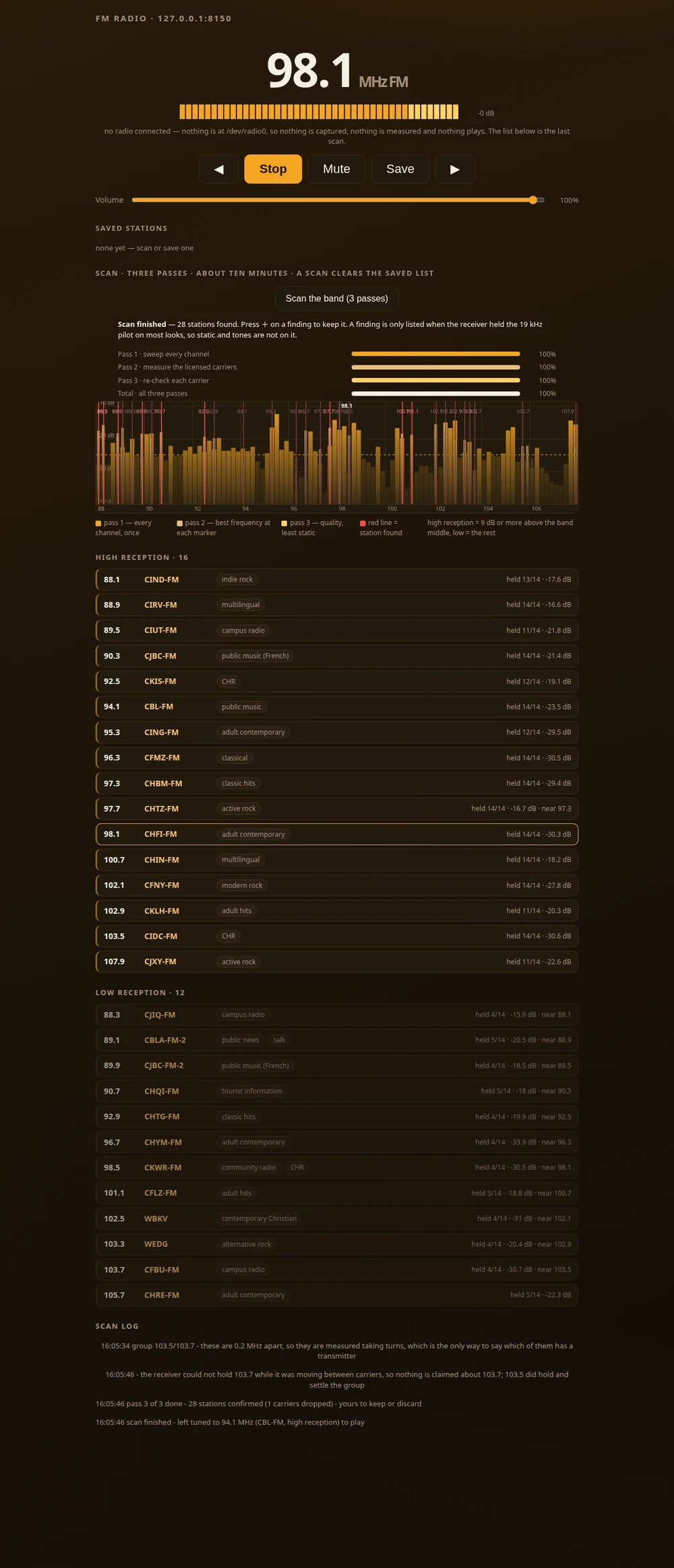
Everything the page does, top to bottom, with nothing cropped away: the frequency, the transport buttons, the volume, the scan's three-pass panel with the spectrum it actually measured, and the two lists it produced. This is the page as it stands on the machine it was written on — no radio is plugged in, so it says exactly that, refuses to capture anything, and shows the last scan rather than pretending.
A scan that ranks by loudness is the easiest thing to write and the least useful: on a real receiver the noise floor is loud too, and a strong station's skirt reaches half a megahertz either side. So this one asks a question with a factual answer instead.
Every FM stereo transmission carries a pilot tone at 19,000 Hz. Mono broadcast and empty noise carry none. The test measures the pilot against the noise beside it — a locked station reads +20 dB and up, hiss reads +1.8 dB or less — and a channel is only called a station above 15 dB.
A bare tone or an interfering carrier can be loud and steady and still not be a station. The tone is recorded as evidence, never as the reason: a channel with a carrier and no pilot stays off the list, however strong it sounds.
This receiver switches between states in stretches of seconds, so carriers measured one at a time are compared against different receivers, not against each other. Nearby carriers are therefore measured taking turns, which is the only way to say which of the two has the transmitter on it.
Unplug a USB input and Linux does not report an error — it moves the streams that pointed at it to the default input, which is usually the built-in microphone. That was measured, not imagined: the capture read the room, a loopback played the room back into the speakers at rising volume, and a scan would have swept the room and called it the band.
One Python file, the standard library only, in a small image. Your host supplies three things a container cannot: a working kernel driver for the stick, the audio server it plays through, and that server's socket.
cd usb-fm-radio
docker compose up -d --build
# open http://127.0.0.1:8150/
Anything you would edit, override from the shell:
RADIO_PORT=9000 docker compose up -d ·
RADIO_DEVICE=/dev/radio1 ·
RADIO_SOURCE=alsa_input.usb-…. docker compose down keeps your saved
stations; down -v throws them away.
docker build -t usb-fm-radio .
docker run -d --name usb-fm-radio \
  --device /dev/radio0:/dev/radio0 \
  -p 8150:8150 \
  -e RADIO_BIND=0.0.0.0 \
  -e RADIO_DATA=/data \
  -e PULSE_SERVER=unix:/pulse/native \
  -e XDG_RUNTIME_DIR=/pulse \
  -v usb-fm-radio-data:/data \
  -v "${XDG_RUNTIME_DIR:-/run/user/$(id -u)}/pulse/native:/pulse/native" \
  --restart unless-stopped \
  usb-fm-radio
RADIO_BIND=0.0.0.0 is not optional in a container — a published port
arrives from outside the container's own loopback, so an app listening on 127.0.0.1
is unreachable whatever -p says. If your audio server does not use a cookie, leave
the cookie mount out: on a PipeWire machine Docker will create a directory where the file
should be, and the server then rejects every client.
error gathering device information while adding custom device "/dev/radio0" —
Docker will not start at all when a device path is missing. Drop --device
(compose: comment the line out) to read the page without a radio.
ls -l /dev/radio0 and pass it in.
ls -l ${XDG_RUNTIME_DIR:-/run/user/$(id -u)}/pulse/native.
| Variable | Default | What it does |
|---|---|---|
RADIO_DEVICE | /dev/radio0 | the V4L2 radio device |
RADIO_SOURCE | empty |
the audio input. Empty means discover it at start-up — the first
alsa_input.usb- entry in pactl list short sources. A
microphone is never chosen.
|
RADIO_PORT | 8150 | the page's port |
RADIO_DATA | /data | where saved stations and the last scan are written |
RADIO_V4L2 · RADIO_PAREC · RADIO_PACTL |
v4l2-ctl · parec · pactl |
the tool names, if they are not on PATH |
The sixteen carriers this scan called High reception, in frequency order, exactly as the page lists them — frequency, call sign, city and format, with the rate the pilot held and how far it stood above the noise. Same receiver, same antenna, indoors.
Twelve more carriers were heard but not held often enough to be called stations, and they are listed separately as Low reception rather than mixed in. The station table inside the program — frequency, call sign, city, format — was compiled from Wikipedia's lists of radio stations, which is why it is credited under CC BY-SA 4.0.
/dev/radio0 — the driver, not the brand, decides. The container cannot load a
kernel module, so it has to be working on the host already. The USB receivers it can drive —
with their USB IDs — are listed under USB devices it can drive.
The program collects nothing and sends nothing. It reads your radio device, plays the
audio through your own audio server, and writes your saved stations to a file you chose.
This page is where a choice exists, and it is yours: there is no analytics script in this
document at all — the tag is created by consent.js and only after you answer yes. If
you say no, this page makes zero requests to Google, and you can change your mind at any
time from in
the footer. If you allow it, the page counts visits and nothing else: no profile is built, no
advertising identifier is read, and nothing is sold.
One thing on this page sends without asking, and here is why that is not a loophole. If
the page throws where you are, it reports the error to this site — to
/api/fault on this same address, nowhere else — so that a breakage on your machine
can be found instead of staying invisible for ever. It sets no cookie and keeps nothing: what it
has already sent is a variable that dies with the tab. It carries no visitor id, no browser
string and no referrer, and every URL in it is stripped of its query, so nothing you typed into
an address bar travels.